Analytics Without Google Analytics (or Any Third-Party Tracker)
Building First-Party Analytics: No Google, No Plausible, No Cookie Banner I run my blog on Next.js, Go, Postgres, and Redis. No third-party trackers. Here's how a fire-and-forget event pipeline (Browser -> Go API -> Redis queue -> Postgres) gives me page views, scroll depth, read time, and referrers without shipping a single tracking script to readers. Plus: the PgBouncer + prepared statements bug that took down my overview endpoint, and how I built email notifications.
I run Krish Blog on a simple stack: Next.js on Vercel, Go API on Railway, Postgres on Neon, Redis on Upstash. No Google Analytics. No Plausible script. No cookie banner for tracking.
This post is how I built first-party analytics that lives entirely in my own backend and what I actually measure.
Why bother?
Third-party analytics are convenient, but for a personal blog they come with tradeoffs:
- Extra JavaScript on every page
- Data sitting on someone else's servers (not that big tbh)
- Privacy policies, consent UX, and ad-blockers eating your numbers
- Paying for features I don't need
I wanted something smaller: page views, scroll depth, read time, referrers, devices, which are more than enough to know what's working, nothing creepy for a personal blog.
High-level architecture
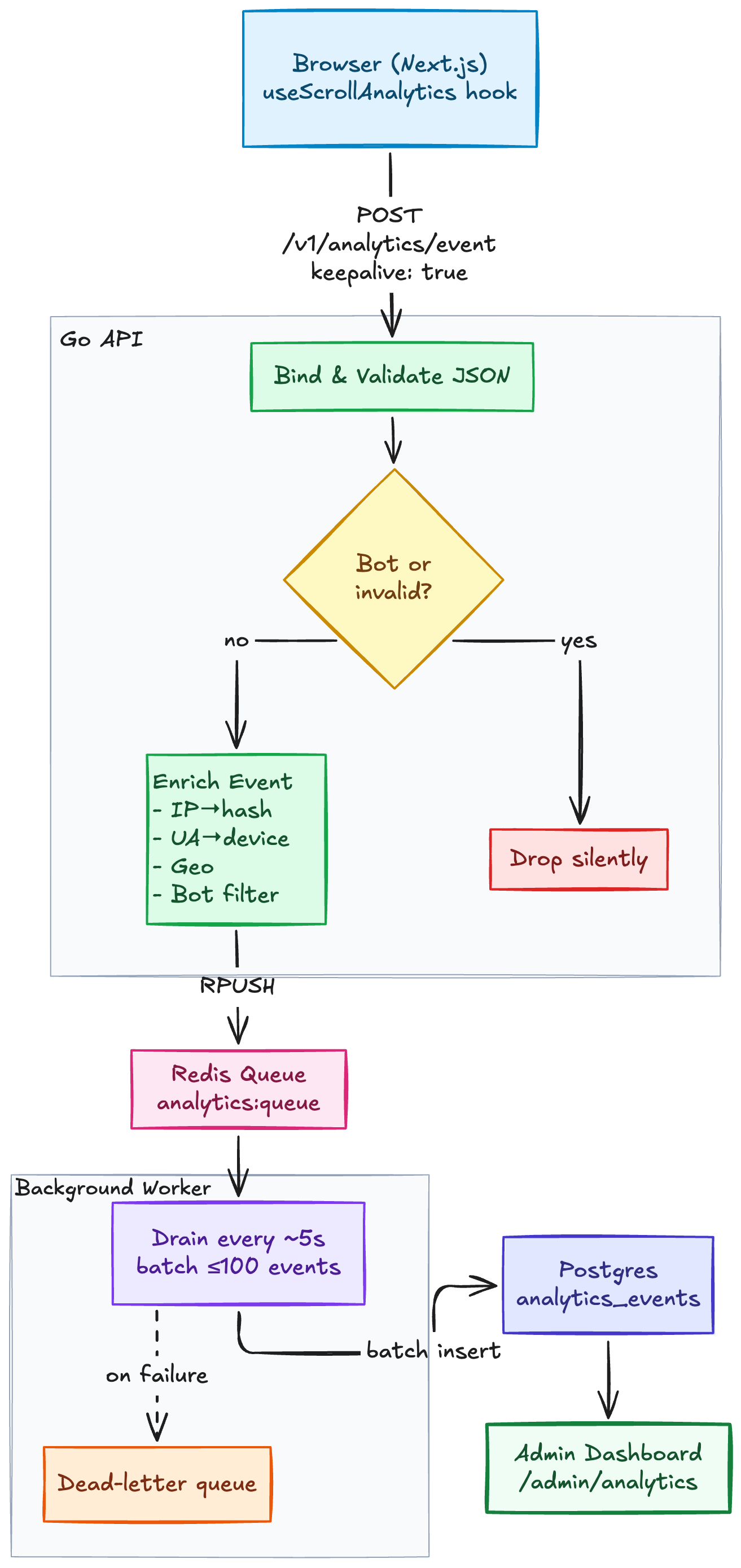
Analytics pipeline architecture
Fig 1: Event flow from browser to admin dashboard
The HTTP handler never blocks on a database write. Events go into Redis; a background processor batches them into Postgres. If Postgres is slow, the page still loads fast.
What the frontend sends
A small React hook runs on public pages (useScrollAnalytics). It tracks:
| Event | When |
|---|---|
page_view | Homepage, about, section pages |
post_view | Individual blog posts |
scroll_depth | 25%, 50%, 75%, 100% scroll milestones |
read_complete | User scrolled to the bottom |
session_end | Tab close / navigate away (duration in ms) |
Each event includes:
session_id-> random ID insessionStorage(not a cookie, cleared when the tab closes)path-> e.g./post/my-recipepost_id-> UUID when on a postreferrer->document.referreron first view
The client calls fetch() with keepalive: true so events still send during page unload. Failures are swallowed, analytics should never break reading.
No fingerprinting. No cross-site IDs. No email.
What the backend does
1. Fast ingest
POST /v1/analytics/event binds JSON, validates, and enqueues. Invalid or bot traffic is dropped silently so scrapers don't pollute stats.
2. Enrichment (server-side)
Before queueing, the API adds:
- IP hash — SHA-256 of IP + salt, truncated. Raw IPs are never stored.
- Device / browser / OS parsed from User-Agent.
- Country from
CF-IPCountrywhen behind Cloudflare (optional and still improving this). - Bot filter -> User-Agents matching known crawlers are ignored
3. Async flush
A goroutine drains Redis every ~5 seconds, inserts up to 100 events per batch into analytics_events, and logs failures to a dead-letter queue key.
4. Admin reads
Authenticated endpoints aggregate:
- Total views & unique visitors (by IP hash)
- Average scroll %
- Average read time
- Top posts, referrers, countries, devices
- Daily traffic chart
All queryable from /admin/analytics in the same admin UI I use to publish posts.
Privacy choices (intentional limits)
- Session ID in sessionStorage are not persisted across browser restarts
- Hashed IPs are used for uniqueness without storing PII
- No third-party scripts so readers aren't tracked by Google/Facebook pixels
- No commenter email in analytics as comments are a separate system
I'm not building ad targeting. I'm answering: Did anyone read this? Did they finish it? Where did they come from?
One Lesson I learned the hard way: Neon’s connection pooler (PgBouncer) and Go’s default prepared statements don’t mix. I switched to pgx with simple protocol and inlined LIMIT clauses. If your overview endpoint returns 500s with errors about prepared statements or bigint type mismatches, that's usually the culprit.
Is it worth it?
If you're running a side project blog and you care about ownership, privacy, and learning? yes. The whole pipeline is maybe a few hundred lines of Go and one React hook. If you need enterprise analytics tomorrow, use Plausible or Fathom and ship your essay.
I wanted to understand the full path from someone scrolls to a number on my dashboard. Building it meant I also noticed when it was broken which is another story entirely.
Email subscribers
Readers can subscribe from the footer. Flow:
- Subscribe -> confirmation email (double opt-in)
- Confirm -> added to confirmed list
- Publish a post -> every confirmed subscriber gets emailed automatically
The admin dashboard tracks:
| Metric | Where |
|---|---|
| Confirmed subscribers | Dashboard + Analytics |
| Pending (unconfirmed) | Dashboard + Analytics |
| Per-post email reach | Analytics -> "Email reach" table |
| Sent vs failed | 3/3 reached or 2/3 reached (1 failed) on publish |
When I hit Publish, the backend records a post_notifications row: total confirmed at send time, how many emails succeeded, how many failed. No guessing whether anyone got my food recipe.